Archive for the ‘hash’ Category

#Location in twitter and human markup

Saturday, January 26th, 2008

UPDATE: Learned from @indiekid and @w1redone over dinner that (a) others were using this convention two months earlier in California (doh!) and (b) there is a site dedicated to tracking hashtags: hashtags.org. Cool that Jason and I independently hit upon the same symbol to indicate locations.

The web has a new convention for usernames, could we use one for locations? And why do these things catch on?
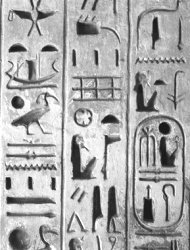
In Egyptian Hieroglyphics, names were always circled–an early example of semantic tagging.

Twitter users created the ‘@username’ convention on their own almost as soon as the service started, and it has now spread beyond twitter. Usernames are prefixed with a @ symbol to indicate that you’re talking about a person, and the system can turn that name into a link.

In December Jason Lange and I hatched the idea of using hash marks to indicate locations. We settled on the # symbol because (a) @ is already taken (b) it sorta looks like grid lines and (c) it is used URL’s to indicate a location on a page. Of course, we twittered our new idea:

Brainstorming like crazy with @susqhanamj at
#trilogy.  - 09:15 PM December 07, 2007

At dinner last night, I heard the folks at Twitter HQ are talking about the this geo-hash convention.

But what is it good for? Imagine if each location had it’s own page. So in my tweet above, you could click through to a #trilogy page for the Trilogy Wine Bar in Boulder. You could see other people who have talked about it and get a sense for the sort of people who go there.

Who creates content for these pages? Twitter could allow businesses to create their own accounts (as Facebook now does), but that wouldn’t cover things like parks and geographic landmarks. So better yet: make locations into Wiki pages that anyone can edit.

No word from Egyptologists on what symbols they used for locations…

Geekout: How to Make Short URL’s

Wednesday, December 5th, 2007

(Yet another geeky post. Apologies to non-programmers, though you might enjoy making some short URL’s.)

Keeping URL’s short is becoming important. It began years ago with tinyurl.com, mostly because email clients were chopping URL’s that wouldn’t fit on one line. Text-messaging/SMS sites like Twitter have intensified the need for keeping things short.

Last week my friend Danny Newman asked me for help with creating maximally short URL’s for one of his projects. Danny wanted to use at most 5 characters. Given that there are 93 valid symbols for each slot, that is enough to encode about 3.2 billion unique addresses. (That’s 93^5.) Not bad!

I came up with code (below) that converts a number into the shortest possible representation in a URL path. (E.g. the number may be an ID from your database, or the output of a hash function.) If you’re viewing this page on wanderingstan.com, you can try it out here: (See how big you have to make the number before the URL gets longer.)


And here is the code. This is in javascript, but it ports easy.

  function convertNumberToURLchars(N, padding) {      // Standard unique chars valid in a URL path    var chars = "0123456789"               + "abcdefghijklmnopqrstuvwxyz"              + "ABCDEFGHIJKLMNOPQRSTUVWXYZ"              + "$-_+*,|\^~`<#%/?@&";                  // These chars will not be recognized as part     // of URL by certain email clients (Outlook)     // if they are the last char in the URL.    chars += "=:{}()[]'>,.!" + '"';         var radix = chars.length;    var URLchars=""    var Q = Math.floor(Math.abs(N));    var R;        // Construct the unique character string    while (true) {      R = Q % radix;      newDigit = chars.charAt(R)      URLchars= newDigit + URLchars;      Q = (Q-R)/radix;       if (Q==0) break;    }        // Handle padding    for (var i=padding-URLchars.length; i>0; i--) {      URLchars = chars[0] += URLchars;    }        return (URLchars);  }  

Small point: As noted in the comments, some punctuation characters (14 in all) won’t be counted as part of the URL by certain email clients when they are the last character. The way to avoid this is simply not to use the last 14 numbers available for a given URL length. Danny wanted 5 characters, so then instead of having 6956883692 unique addresses, he’ll have to settle for 14 less with 6956883678. The former would give a code of http://example.org/”"”"”, the latter gives http://example.org/”"”"&.

Hope you might find this useful someday.

(Thanks to linuxtopia for their radix code sample.)